
Send Better Emails to Your Fans
Send Better Emails to Your Fans

Email remains the most direct way to reach your fans. Unlike social media algorithms, an email lands directly in someone's inbox. That connection is incredibly valuable — and it deserves tools that match. We've made major improvements to the email tools on Reward Music so every message you send looks professional, feels personal, and arrives at exactly the right time.
Reusable Email Templates
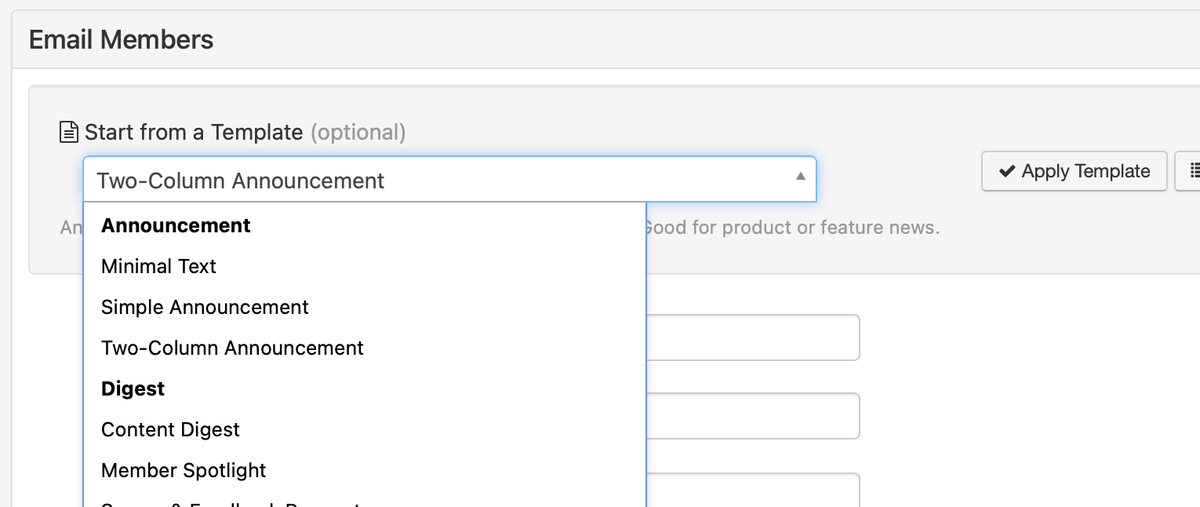
Think about the emails you send most often — new release announcements, tour date updates, merch drops. These follow predictable patterns, yet until now you were building each one from scratch. Now you can create and save reusable templates with full rich-text editing, then apply any template to a new email with a single click. It pre-fills the subject line, sender name, and body so you start with a polished foundation rather than a blank page.
Templates You Might Build
New release: Album art placement, streaming links, personal note area, and social buttons. Swap in the new details in minutes.
Show announcement: Venue details, ticket link, date/time, and support acts. Reuse for every show on the tour.
Merch drop: Product images in a multi-column layout with pricing and a clear call-to-action to the store.
Monthly newsletter: Sections for news, upcoming dates, a featured track, and community highlights.
If you manage multiple sites, system-wide templates can be shared across all of them. Templates also enforce consistency — every email carries your branding and voice, even when you're in a rush.
Automated Email Workflows
Some of the most important emails are the ones that should happen at exactly the right moment — and those are the ones most likely to fall through the cracks. Email workflows let you build automated sequences that trigger based on user actions, membership status, or purchase events. Set it up once and it runs on its own.
Here's what a new subscriber welcome sequence might look like:
Immediately: Welcome email introducing yourself and linking to your best content.
3 days later: Follow-up with your most popular tracks or latest video.
7 days later: Introduce your store with a merch highlight or premium content link.
14 days later: Invite them to follow on social media or share your music with a friend.
That entire sequence runs automatically for every new subscriber. You can also build post-purchase follow-ups, membership welcome series, and re-engagement campaigns for lapsed subscribers. Workflows support timed delays between each step, so you control exactly when each email in the sequence is delivered.
Personalisation Shortcodes
Insert shortcodes into email subjects and bodies, and each one is replaced with the recipient's actual details at send time:
{{last_name}} → Chen
{{full_name}} → Sarah Chen
{{email}} → sarah@example.com
{{site_name}} → Reward Music
{{site_url}} → rewardmusic.com
{{site_support_email}} → support@rewardmusic.com
Instead of "Hey there, we've got new music" your fans receive "Hey Sarah, we've got new music." It's a simple change that consistently increases open rates and makes mass emails feel like personal messages. Shortcodes work everywhere — subjects, bodies, templates, and workflow emails.
Multi-Column Email Layouts
A new Columns button in the editor lets you insert 2-, 3-, or 4-column layouts, sidebars, and asymmetric grids. Build product showcases with images beside descriptions, newsletters with main content and a sidebar, or membership tier comparisons laid out side by side.
Behind the scenes, these layouts are automatically converted to table-based markup — the only reliable way to render columns consistently across Gmail, Yahoo, Outlook, and every other major email client. You design visually; your fans see a perfectly rendered email regardless of where they read it.
Putting It All Together
These tools are designed to work together. Build a personalised multi-column template and use it as the first step in an automated workflow. The tools compound — the more you combine them, the more professional and effective your communication becomes.
- Templates save time and enforce consistent branding on every email
- Workflows nurture fans automatically without manual effort
- Shortcodes make mass emails feel personal and boost open rates
- Multi-column layouts render perfectly in every email client
- All four features integrate seamlessly with each other