
Build Beautiful Content with the Upgraded Editor
Build Beautiful Content with the Upgraded Editor

Your Reward Music site is your home on the web. The pages you build and the content you publish shape how fans experience your brand. Until now, creating rich, visually interesting pages meant either accepting the limitations of a basic text editor or diving into custom HTML. That changes with this update.
The content editor has been significantly upgraded with multi-column layout tools, a built-in image editor, and a modernised writing experience. Together, these give you the ability to create professional, visually compelling pages entirely within the admin — no code, no external tools, no compromises.
A Modern Editor That Gets Out of Your Way
The rich text editor has been upgraded with a refreshed toolbar, cleaner interface, and smarter behaviour throughout. The biggest quality-of-life improvement is drag-and-drop image upload — just drag an image from your desktop straight into the editor and it drops right where your cursor is. No more clicking through upload dialogs and repositioning.
On smaller screens, the toolbar wraps neatly so every tool remains accessible without cluttering the interface. The editor also produces cleaner HTML output, meaning fewer formatting quirks and more predictable behaviour when pasting content from other sources.
Multi-Column Layouts Without Code
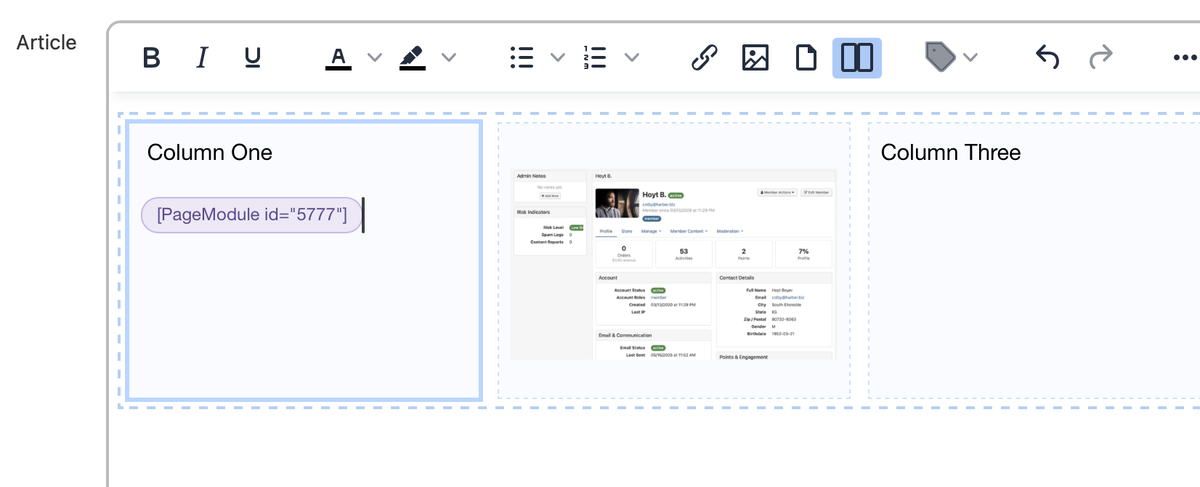
This is the feature that fundamentally changes what you can build on your site. A new Columns button in the editor toolbar lets you insert 2-, 3-, or 4-column layouts, sidebars, and asymmetric grids directly into any page, post, or article. Place your cursor where you want the layout, select the structure, and start adding content to each column.
Why this matters: Before this, the only way to create a two-column page layout was to write raw HTML with CSS — something most site admins can't or shouldn't have to do. Now you get the same result with a few clicks. The layouts adapt automatically to mobile, stacking columns so content looks right on every screen.
Page Layouts You Can Build
Album landing page: Artwork on the left, track listing and streaming links on the right. A full-width story section below, then a three-column grid of music videos.
About / bio page: Your photo in a narrow sidebar column, full bio and press quotes in the wider column beside it.
Merch showcase: A three or four-column grid of product images with titles and prices beneath each one.
Tour page: Tour poster on one side, list of dates and ticket links on the other.
Press kit: Columns for high-res photos, bio, key stats, and download links — everything a journalist needs in one place.
Membership tiers: Side-by-side columns comparing what fans get at each support level.
Columns can be mixed with regular content. You might have a full-width introductory paragraph, followed by a two-column section, then a full-width call-to-action at the bottom. The column builder is a layout tool you use where you need it, not a rigid template for the entire page.
Edit Images Without Leaving the Page
You upload an image, step back, and realise it needs a crop. Or the brightness is off. Or it needs rotating. Previously that meant opening a separate editor, making the change, exporting, and re-uploading. Now you can do it all directly inside the admin.
The built-in image editor lets you crop, rotate, adjust brightness and contrast, apply filters, and re-upload — all from inside the image picker or directly within the content editor. The updated image replaces the original right where it sits. No round-tripping required.
When This Saves You the Most Time
Album artwork: Quick crop for the site's display ratio without round-tripping to Photoshop.
Event banners: Brighten a dark stage photo and boost the contrast right there in the editor.
Product images: Crop a merch photo tight so the item fills the frame professionally.
Batch consistency: Use brightness and filter tools to give photos from different sources a similar look across a page.
The image editor is especially powerful in combination with the column builder. When designing a multi-column layout, you can fine-tune each image to fit its column — cropping for the right aspect ratio and adjusting brightness so images match across the page.
A Complete Content Creation Toolkit
The upgraded editor, column builder, and image editor work together as an integrated content creation toolkit. You write in a modern, clean editor. You structure pages with multi-column layouts. You fine-tune images in place. All without leaving the admin, writing code, or switching between tools.
- Drag-and-drop images for faster, more natural content creation
- Multi-column layouts let you build professional pages without code
- Responsive markup ensures layouts look great on desktop and mobile
- In-place image editing saves time on every photo you publish
- All tools work together in a single integrated editing experience
Whether you're building a landing page for your next release, designing an about page that tells your story, or creating a merch showcase, the tools are now there to make it look exactly the way you envision it.