
Re-Engage Your Fans with the New "What You Missed" Builder
Re-Engage Your Fans with the New "What You Missed" Builder

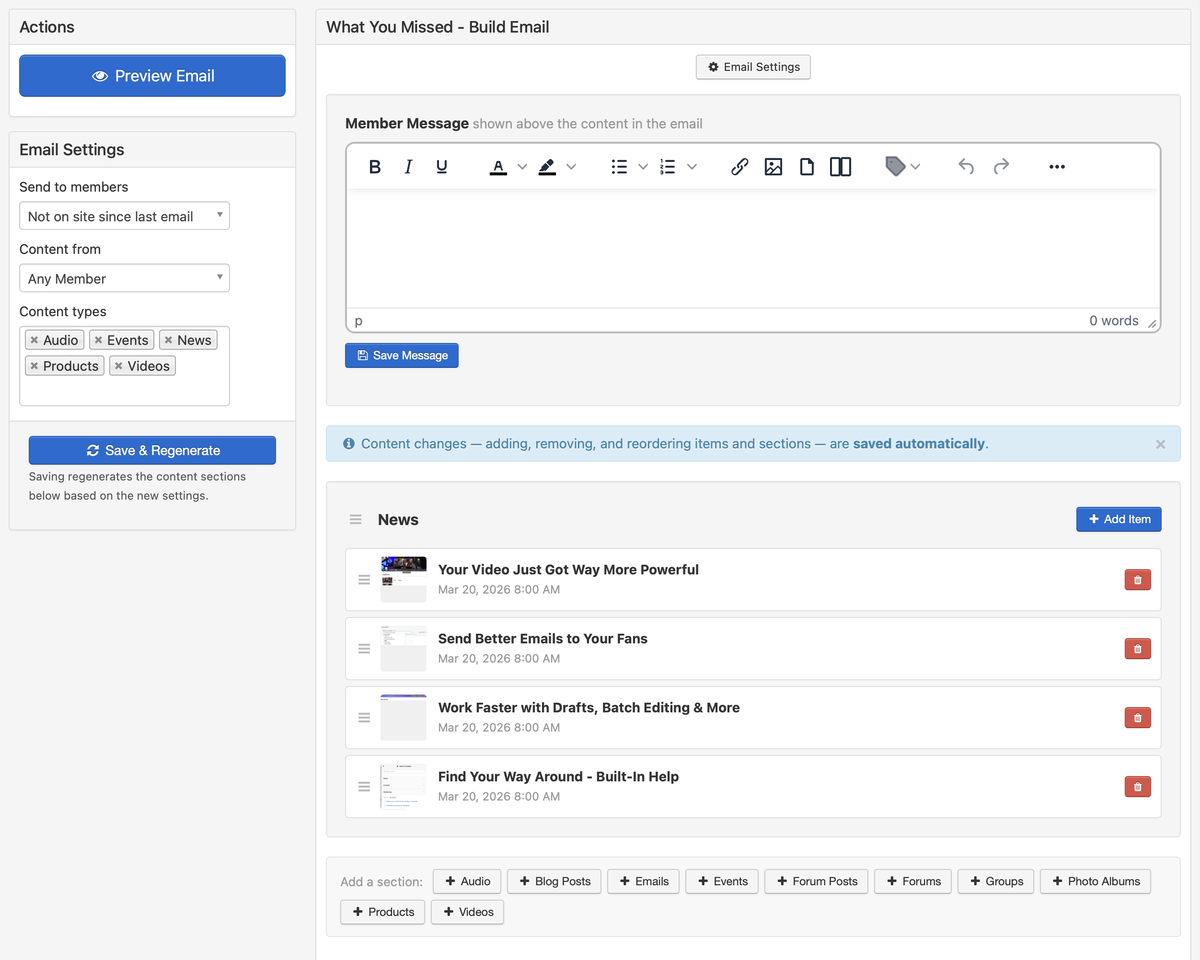
Not every fan visits your site every day. Life gets busy, feeds get crowded, and even your most engaged supporters can fall out of the habit. The "What You Missed" email exists to bring those fans back — a curated digest of your best recent content that gives people a reason to return. It's one of the most effective tools you have for re-engagement.
Until now, the What You Missed email was generated automatically and you had limited control over what it included. That changes with a dedicated email builder that puts you in full control, paired with a new device preview feature that lets you see exactly how any email will look on desktop, tablet, and mobile before you send it.
The What You Missed Builder
The What You Missed email has been completely redesigned, and we've built a dedicated email builder to go with it. You'll find it under the Emails section of your admin. Instead of relying on an automatic selection of recent content, you now hand-pick exactly which articles, events, videos, and other content you want to feature in each digest.
This changes the What You Missed email from an automated summary into an editorial tool. You decide what your audience sees when they re-engage — which means you can be strategic about it.
Why curation matters: An automated digest treats all content equally. But you know which pieces are your strongest, which ones are most likely to pull someone back in, and which ones tell the story of what's been happening. A curated digest converts better because every item in it was chosen with intent.
How to Think About Curation
Lead with your best: Put your strongest piece of content first. If you dropped a new music video and also posted a blog update, lead with the video — it's the hook that gets people to click through.
Mix content types: Combine an article, a video, and an upcoming event. Variety gives different kinds of fans a reason to engage.
Create urgency: Feature an event or limited-edition product that's time-sensitive. A digest that says "this is happening soon" is more compelling than one that just says "here's what happened."
Tell a story: If you've been working toward something — a new release, a tour, a milestone — curate the digest to show that arc. Three or four pieces that build toward a moment are more engaging than a random selection.
The builder uses a content picker where you search for and select items from your library. Drag items to reorder them. Remove anything that doesn't fit. The result is a digest that feels intentional rather than algorithmic. A page tour is also available from the Help menu if you want a step-by-step walkthrough of the builder the first time you use it.
Updated Email Design
Alongside the new builder, the What You Missed email itself has been redesigned. The layout is cleaner and more modern, with better visual hierarchy so your featured content stands out. Each item gets proper spacing, clear titles, and a prominent call to action. The design adapts well to both desktop and mobile inboxes, so your digest looks polished no matter where your fans read it.
The visual improvements aren't just cosmetic. A well-designed email gets higher click-through rates because readers can quickly scan and identify what interests them. When each content item is clearly presented with a strong visual structure, fans are more likely to click through to the piece that catches their attention.
Email Device Preview
Before you hit send on any email — not just the What You Missed digest — you can now see exactly how it will look on desktop, tablet, and mobile. The device preview is available when composing any email and when editing email templates.
Different email clients and screen sizes can render the same content very differently. A two-column layout that looks perfect on desktop might stack awkwardly on a phone. A headline that fits on one line in Gmail might wrap in Outlook. The device preview gives you the confidence that your message looks polished before it reaches anyone's inbox.
More than half of all emails are opened on mobile. If you're not checking how your emails look on a phone before sending, you're leaving the experience to chance for the majority of your audience. The device preview makes that check effortless — toggle between views and catch layout issues in seconds.
When to Use Device Preview
Multi-column emails: Check that columns stack properly on mobile rather than rendering side-by-side at an unreadable width.
Image-heavy emails: Verify that images resize correctly on smaller screens and that text remains legible beside or below them.
New templates: Preview every template you create across all three device sizes before saving it for reuse.
Important announcements: For high-stakes emails like release announcements or sale promotions, preview on every device so you know the first impression is right.
Better Emails, More Engaged Fans
The What You Missed builder and device preview work together to raise the quality of every email you send. You curate the content your fans see when they re-engage, and you verify that the presentation is polished on every device before it goes out.
- Hand-pick exactly which content appears in your re-engagement digests
- Curated digests convert better than automated selections
- A redesigned email layout puts your content front and centre
- Device preview catches layout issues on desktop, tablet, and mobile before you send
- Preview works on all emails and templates, not just the What You Missed digest