
Grow Your List, Welcome New Fans & Work Faster
Grow Your List, Welcome New Fans & Work Faster

Growing your audience, making a strong first impression, and keeping fans engaged are three things that should happen automatically. You shouldn't have to remember to send a welcome email, manually add signup forms to every page, or wonder whether your site metrics are trending up or down. This update brings a collection of improvements that handle all of that — plus faster tools for importing content and finding settings when you need them.
Embedded Email List Signup Forms
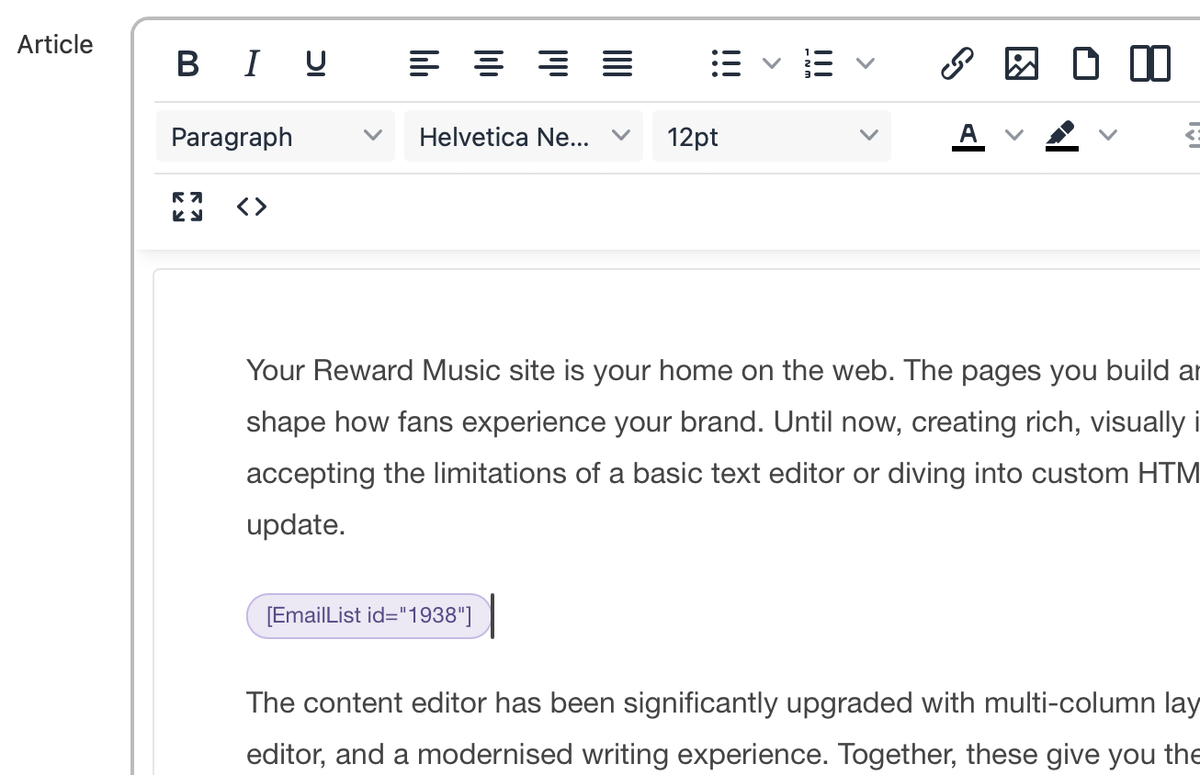
You can now attach an email list signup form directly to any article, page, post, or other content from the content editor. The form renders inline on the public page alongside your content, so readers can subscribe without navigating away.
This is a significant change from having signup forms only on dedicated pages or in sidebars. When a fan finishes reading a great article or watching a video, the signup form is right there — at the moment of highest engagement. That proximity makes a real difference in conversion rates.
How it works: Open any piece of content for editing, go to the Attachments panel, and search for any active email list. Select it, save, and the signup form appears on the public page. When a reader submits the form, it processes without a page reload and shows a confirmation prompt asking them to check their email. No code, no widgets, no third-party tools.
Where to Add Signup Forms
Blog posts: Attach a signup form to your most-read articles. Readers who made it to the end are already interested — make it easy for them to stay connected.
Release pages: When fans come to check out a new release, capture their email so you can notify them about the next one.
Event pages: Let visitors subscribe for updates about future shows in their area.
Free content: If you offer free tracks or downloads, the signup form is a natural exchange — they get great content, you get a way to reach them again.
Welcome Emails for New Subscribers
Each email list can now send an automatic welcome email to every new subscriber. Enable it by checking Send welcome email on the email list settings, then write the from name, subject, and body using the full editor. The email is sent automatically after a subscriber confirms their signup.
A welcome email is your first direct communication with a new fan. It sets the tone for the relationship, tells them what to expect, and gives them something to engage with right away. Without one, a new subscriber confirms their email and then … silence. That's a missed opportunity.
What to Include in Your Welcome Email
A personal introduction: Tell them who you are and what your site is about in your own voice. Make it feel like a real message, not an automated confirmation.
Your best content: Link to your most popular tracks, videos, or articles. Give new subscribers a starting point so they immediately see the value of being on your list.
What's coming next: If you have an upcoming release, tour, or event, mention it. Give them something to look forward to.
A simple ask: Invite them to follow you on social media, share your site with a friend, or check out your store. One call to action is enough.
Welcome emails are set up per email list, so different lists can have different welcome messages. A list for general fans might get a broad introduction, while a list for a specific project or event might get a more targeted message. Set it once and every new subscriber receives it automatically.
Redesigned Daily Report Email
The daily report email has been completely redesigned with a scorecard layout that surfaces the metrics that matter most. Instead of a dense table of numbers, you now get a clean visual summary with inline line graphs showing the trend at a glance and week-over-week delta indicators that tell you instantly whether engagement is up or down compared to the previous week.
A new Top Pages section shows the most-viewed content from the period, so you can see what's resonating with your audience without logging into the admin. There's also a contextual nudge bar with a call to action and a direct link to the relevant how-to guide in the email footer.
Why the redesign matters: The daily report is the email you see every morning. If it's hard to read or doesn't surface the right information quickly, you'll stop paying attention to it. The new scorecard layout is designed so you can glance at it on your phone in ten seconds and know whether things are on track.
Video: Up Next Recommendations
Keep viewers watching with Up Next recommendations that appear when a video ends. Related videos from your library are surfaced automatically, so fans always have somewhere to go next. Instead of the video ending and the viewer leaving, they see a selection of your other content and keep exploring.
We've also improved autoplay behaviour: videos now attempt to autoplay on page load, and if the browser requires user interaction first, a clean tap-to-unmute overlay appears so fans can start watching with a single tap. The combination of smoother autoplay and Up Next recommendations means fans spend more time with your video content without any manual curation on your part.
Content Import — New 3-Step Wizard
The content import experience has been completely rebuilt as a guided 3-step wizard. Upload your CSV, map your columns to the right fields, then review a summary before committing. Each step is clearly defined so you always know where you are in the process, and the review step lets you catch mapping mistakes before they affect your data.
The wizard supports a wider range of fields than before and works across all importable content types: Articles, Events, Locations, Email Lists, Products, and Users. Whether you're migrating from another platform or bulk-updating your catalog, the process is now faster and less error-prone. Step-by-step how-to guides are available in the help drawer under the Content Import group.
Improved Settings Navigation
Finding the right setting is now significantly faster. Every settings section has been updated with a dedicated icon and description text so you can orient quickly, and a new search lets you jump directly to any setting across all sections without scrolling through menus.
This might sound like a small change, but settings are something you interact with repeatedly. The time saved by being able to type "email" or "domain" and jump straight to the right page adds up — especially when you're in the middle of setting something up and don't want to lose your train of thought.
The Full Picture
These features cover the full fan lifecycle: embedded signup forms capture new subscribers at the moment of highest engagement, welcome emails make a strong first impression, the daily report keeps you informed about what's working, and Up Next recommendations keep fans exploring your content. Behind the scenes, faster imports and better settings navigation make managing all of it more efficient.
- Embedded signup forms convert readers into subscribers without leaving the page
- Automated welcome emails make a strong first impression with every new subscriber
- The redesigned daily report shows your key metrics at a glance with trend lines and deltas
- Up Next recommendations keep fans watching after a video ends
- The 3-step import wizard makes bulk content migration faster and less error-prone
- Settings search lets you jump to any setting instantly